Etext & Ebook Resources
Click on image to visit learn71.ca ARC BC page
Accessible Resource Centre – British Columbia (ARCBC)
ARCBC provides BC educators free digital accessible format alternatives to hard-copy print learning materials to support access to learning for students. The goal of ARC-BC is to provide BC students with perceptual (or print) disabilities and their educational teams with high quality digital alternate format materials that align with British Columbia’s K-12 curriculum.
Registration is free for BC educators.
District support for ARCBC
District Partner Jane.Rondow@sd71.bc.ca
Learning Support Teacher or Teacher Librarian
Email Luisa.Pereira@sd71.bc.ca to download the book(s) you need for students with perceptual disabilities.
Accessibility
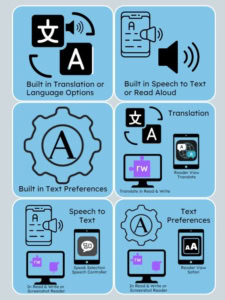
Accessibility & QR Code Cards
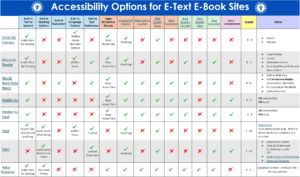
EText and Ebook Accessibility Options Chart
 BROWSE WITH DESTINY.

Destiny is our online catalogue. It is full of digital content carefully curated just for you! Take a moment and browse our growing collection!
 FLY WITH SORA

Our district uses the Sora app for our digital reading platform. Simply download the app on any device and you can read or listen to audiobooks and ebooks!
 DIVE INTO LEARNING
Explore resources designed for young students grades (K-3). Easy-to-read articles, videos and activities to engage early learners help promote independent research skills. Also check out Pebble Go Next for grades (3-6)
eTexts
Freemium, Paid, or Subscription.
Will require an account to be created either by teacher or student or both. Basic free access with premium paid options available.
Leveled Reading and Decodable Book Resources Available at the LRC
LRC has a Decodable Book collection and a Levelled Reader collection. You can find Levelled Readers conversion charts at: LRC Reading Resources – Learn71
To access a quick list of all of our Decodable and Levelled Readers, log into your school library, click on Catalog ->Resources, then scroll down and click on:
OR 

If resources below are accessed from home or a personal device, use the link below for the list of district user name and passwords required for some of the items below.
District 71 Username and Passwords
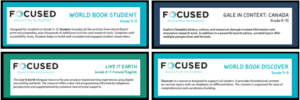
Focus Ed has created “One Page Flyers” for the Digital Classroom Resources which outline some key features of the resource, include some classroom activities, and identify the built-in accessibility features of each resource. Click on the image or the link below to access these recourses.
Focused Ed One Page Flyers
RESEARCH
Encyclopedias
Comox Valley Schools Collection of Research Databases English and French options. Most work with either built in accessibility tools or accessibility tools (Text to Speech and Vision/ Processing tools) we have available on SD71 devices.
Databases
The Gale databases will require a special username and login. Use the link below to access these.


Indigenous Resources

French Resources